To find South Dakota Lottery winning numbers by date, choose the game in the state’s Winning Numbers archive and set a date range around the drawing printed on your ticket. Open the exact dated result to see the numbers and the prize breakdown. The LotterySnap South Dakota results page also lets you start with the game you want to check.
For Powerball, compare the red ball separately from the five white balls. If you have Double Play, compare your numbers against that separate draw. The prize table shows how many entries won at each level and which geography the counts cover. The Winning Players page helps you find published prize and retailer details.
Find a South Dakota lottery result by draw date
Start with the draw date on your ticket, then open the South Dakota Lottery Winning Numbers archive. The state page begins with current game cards and shows the historical search farther down. Scroll to Search for Winning Numbers to control which game and dates appear. From there you can read a dated number set and its prize information together.

Match the game and date printed on your ticket
Look for the issuing state, game name and eligible drawing dates on the paper. If you bought a ticket on Monday for a later drawing, the printed drawing date is the one to enter. The purchase time helps identify the transaction, while the draw date identifies the number set to check. Save both if you need to ask the Lottery about a specific transaction.
Take special care when a ticket covers more than one date. If it covers several drawings, make a short list of the dates from the ticket and compare each one to the archive. Within each drawing, check every printed play on the ticket. A line that misses one draw can still be valid for a later one. Keep the original while any of its drawings remain open.
When checking tickets for several games, group them first. A Saturday Dakota Cash result and a Saturday Powerball result can both belong to that evening while having different rules and number sets. Verify the game name each time you start a search or switch tickets, especially if you view several results in different browser tabs.
Use the official archive filters
Under Game Type, choose the name shown on the ticket. Use the two date controls to set the start and end of the window. A short range around the target date makes the correct card easier to find. A week or month can help when cross-checking several consecutive drawings on the same ticket. When you change the game or the interval, allow the dated cards beneath the controls to refresh.
Use the Draw Date label to select the correct card. Its numbers and game-specific prize information belong to that drawing. Live estimates or a next-draw timer can still appear on a page that has historical results, so read the label next to the numbers. For another view of the games offered by the state, use LotterySnap’s South Dakota results and select the corresponding game.
If you are checking an older ticket and the first interval comes back empty, confirm the start and end dates before drawing a conclusion. A month selector can land in the wrong year when you page backward through several calendars. Choose a narrow range with a date you can read on the ticket. If the draw still cannot be found, save the ticket and contact the operator for help identifying the drawing.
Read South Dakota Powerball numbers and prize details
For Powerball issued in South Dakota, select PowerBall in the state archive and find the draw date on your ticket. The ordinary drawing card shows the five white balls, the separate red Powerball and the Power Play multiplier. Powerball uses the same main draw numbers across participating jurisdictions. For local prize counts, read the state table beside those numbers.
Check the main draw and any Double Play entry
Compare the five white numbers in one group. Then compare the red Powerball in its own position. If you have four white-number matches and your red Powerball matches, look for the row for four white balls plus the Powerball. If a number printed among your white balls happens to equal the red result but your own red Powerball differs, look for the white-ball-only tier that fits your ticket.
Check the printed options beside the play before moving to another card. Power Play affects eligible non-jackpot prizes from the main draw. Double Play uses the numbers on an eligible play in a separate drawing. The South Dakota Double Play page explains that this drawing follows the main draw. A ticket with both options needs the main result with the applicable Power Play rules and the separate Double Play result.
In the archive, the PowerBall selection can display both PowerBall and PowerBall / Double Play cards. Check the date on both. Keep the two number sets separate when comparing the same line. A main-draw match belongs in the main table, while a Double Play match belongs in the Double Play table. If you are only looking up the shared national number set, the LotterySnap Powerball results page is another starting point.
Find out whether a prize table counts South Dakota or national winners
A state archive table puts SD Winners beside the prize tier. The main Powerball table can also show SD Power Play. The number next to a match tier counts winning entries in the named category. The prize column describes the amount for that tier. In particular, a figure in the SD Winners column should be read as a count, even on a line that also has a dollar amount.
The official Powerball results archive lets you open a dated result and see a breakdown. The dated detail view lets you choose All or a jurisdiction including South Dakota in the prize table. Keep the same drawing date and match tier when comparing the state page against the all-jurisdictions view. An entry that is zero for South Dakota can coexist with tickets sold elsewhere that won at that level on the same night.
If you searched for “SD Powerball winners” and wanted to know how many winning plays there were, start with the state prize table for the relevant date. If you want to know whether a large prize was won elsewhere, look at the national result and its winner summary. Claims and published winner profiles have separate records. The prize table can show a winning entry before an individual player is identified in public.
Look up Dakota Cash and other South Dakota draw games
For South Dakota's in-state game, select Dakota Cash in the dated archive or open LotterySnap Dakota Cash results. The state's Dakota Cash game page says regular drawings are Wednesday and Saturday. The game draws five numbers from a single pool of 1 through 35. Match the five-number set against your printed line, then read the table beside the correct draw to see which match tier applies.
A Dakota Cash ticket can carry a separate EZ Match area. The Lottery describes EZ Match as an instant add-on with numbers and prize amounts printed near the bottom of the ticket. If the ticket has this area, compare those printed entries with the Dakota Cash numbers on your ticket as directed by the game. The archived draw results cover the scheduled drawing. That part of the ticket can be checked after the draw, independently of the instant add-on.
When you move from Dakota Cash to a multistate game, start a fresh comparison with the correct game fields. The South Dakota Lotto America page uses a separate All Star Ball alongside its five white numbers. Mega Millions has its own Mega Ball. It is easy to overlook the separate ball when a phone screen puts all the values on one line. Read its label before matching it to the ticket.
Older tickets can also carry a retired game name. The South Dakota Lottery says sales of Lucky for Life ended after the February 21, 2026 drawing, and the new Millionaire for Life game became available the following day. Both names are separate entries in the dated search. For a ticket near that change, use the printed name and the printed draw date as a pair. The new game's results cannot settle a check for the older game. South Dakota Lottery announcement
Scratch tickets follow a different lookup. Use the game title and game number from the ticket to find its rules and status on the operator's site. The draw archive's date filters are for games with posted drawings. A ticket without a draw date is a reason to identify its game type before changing the archive filters again.
Use Winning Players to find published winner and retailer details
Open Winning Players when you want to know which winners or selling retailers the state Lottery has publicized. On that page you can filter by date, city, retailer, prize band and game type, then select Submit. Choose Lotto Games to focus on draw games. The form also has separate choices for scratch games and second-chance prizes.
If you remember the town and prize band but have forgotten the retailer, leave the retailer filter open and search with what you know. If a retailer has several locations, add the city before narrowing by store. You may need to widen the window if you are searching for a claim rather than the draw that produced the prize. A ticket can be claimed after the drawing, so the relevant dates can be days or months apart.
Game pages and the Lottery's retailer listings can show a game name, prize amount, retailer and city for selected wins. A listing may identify a player or display “Anonymous.” Check for a label such as Claimed before treating a date in a retailer profile as a draw date. If you want the number set for that prize, look up the actual drawing in the Winning Numbers archive.
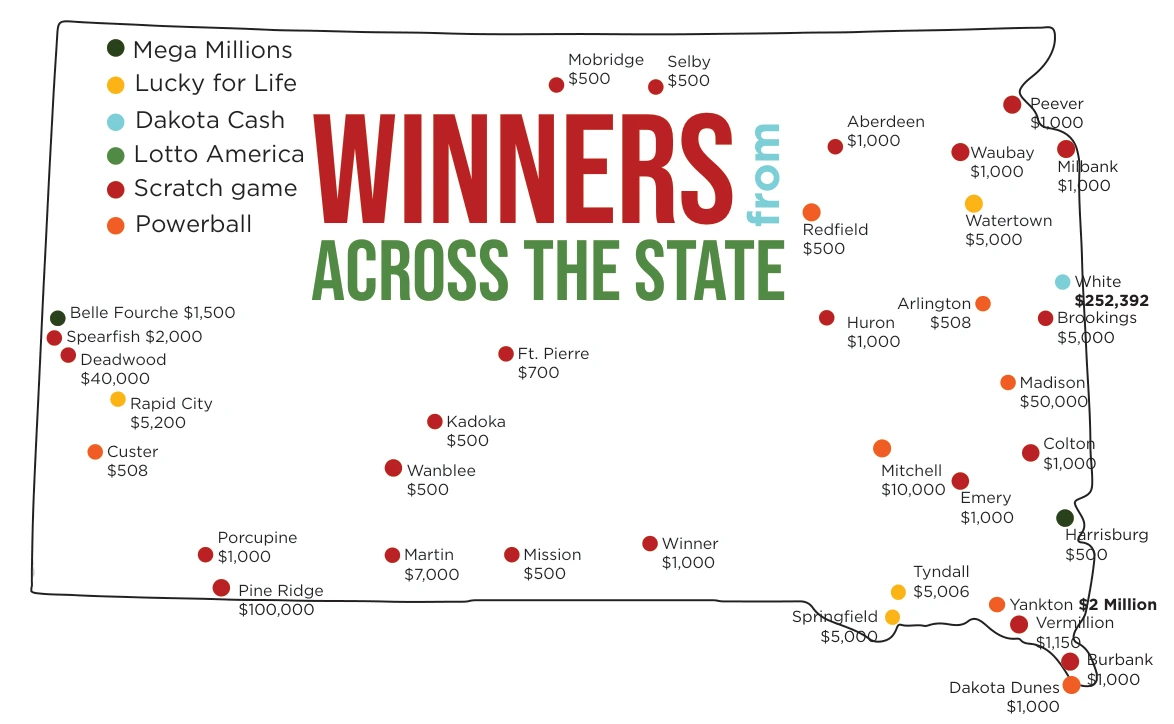
The 2021 South Dakota Lottery newsletter used a state map to show selected published wins across the state. The map at the top of this article is from that issue. It illustrates how the Lottery reports examples by game and place. Use the dated archive to look up a particular number set or prize table, and use Winning Players or an official announcement to look for a public prize listing. 2021 South Dakota Lottery newsletter
When a draw table records winners and a search of published profiles returns nothing, the two views can still be consistent. The first counts winning entries at each prize tier. The second gives details the Lottery has made public. Searching the public list also does not tell you whether your own ticket won. For that, compare the exact drawing or have the original verified.
Check every draw on the ticket before claiming
Write down the game, the eligible draw dates and the number of plays on the original ticket. Use those notes to work through each drawing once. For a ticket with three drawings and two printed lines, there are two lines to compare on each of three dates. Use any separate ball in the correct position and check the options shown on the purchase. If your ticket has a multiplier or additional drawing, consult the rule for that option before recording the result.
Keep track of draws whose results are still pending. If you find a possible match on the first drawing, record its date, match tier and the printed line that appears to have won. When the remaining results become available, check those separately. That record helps if you need to call the Lottery about a particular drawing. Keep your private notes free of the ticket barcode if you plan to share them with someone else.
A quick number comparison in the LotterySnap number checker can help you review a line. If you see a possible win, take the original to a licensed South Dakota Lottery retailer or use the official ticket scanner. Results from a dated archive describe the drawing. Checking the actual purchase lets the Lottery confirm the eligible dates, the selected options and whether the ticket can still be paid.
Read the South Dakota Lottery's claim instructions if the ticket appears to have won. A lotto prize must be claimed within 180 days after the drawing that produced the win. The archive can still show the result after the claim window closes. If you discover a ticket long after buying it, confirm the eligible draw date and ask the Lottery to verify the deadline if you are close to it.
The Lottery also says the Mobile Cashing option for an eligible multi-draw ticket is used after the final draw on the ticket has taken place. When one of the early draws shows a potential prize, keep the signed original and follow up with the Lottery if you are unsure which claim route to use. An in-person check can resolve a damaged ticket, a discrepancy between results or a question about a pending drawing.
For a single draw, the fastest starting point is the game card for the date on the ticket. For more than one draw, widen the window so every eligible drawing is in view and work through the dated cards. When you want to see where a winning ticket was sold or whether a public profile exists, switch to Winning Players or the retailer listing after verifying the draw.

Loading comments...