Use the official NJ Lottery app or an authorized retailer to check an original ticket. Keep ticket checks separate from VIP entries, ePlayslips and mobile claims. This guide explains each route and its limits, with facts checked November 17, 2026; available functions can differ by platform and version.
Download the official app and identify the service you need
The official New Jersey Lottery app can help you check a ticket, inspect results, find a retailer and use other player services. Begin by naming the job you want to complete. Checking an existing ticket, entering a second-chance promotion, preparing a playslip and claiming a prize are different transactions even when the same app provides access to them.
The operator's Ticket Checker web page directs users to its mobile application or a retailer. A search for an online NJ ticket checker should therefore not be read as proof that the operator provides a browser form that validates any uploaded barcode. For an original ticket check, use the channel the operator actually identifies.
Check the store publisher before installing
Follow the store links from NJLottery.com. The official Android listing identifies Official New Jersey State Lottery; the Apple listing identifies New Jersey State Lottery Commission. Other applications can use New Jersey game names in their descriptions without being published by the operator. Confirm the listing identity before allowing camera access or entering personal details.
Check the current compatibility information for your device and review any update offered through that official listing. A tutorial from another year may describe a different version or menu layout. The precise screen shown on your device should guide the next action, particularly when account or claim functions have changed. This guide describes published features checked on November 17, 2026, not a claim that we installed the app on your phone.
Keep download cost separate from game purchases and any unrelated service's fees. The official app's availability does not create a free lottery entry. If a similarly named scanner offers a subscription or in-app purchase, review that product's own terms rather than assuming the payment is required by the New Jersey Lottery to inspect an original ticket.
Our online ticket-scanning guide explains why an image reader, a number comparison tool and an official ticket check should not be treated as interchangeable. That distinction is useful before troubleshooting: if you installed a different product, instructions for the official NJ app may not describe its screens or the records it can access.
Scan the original ticket and interpret the response
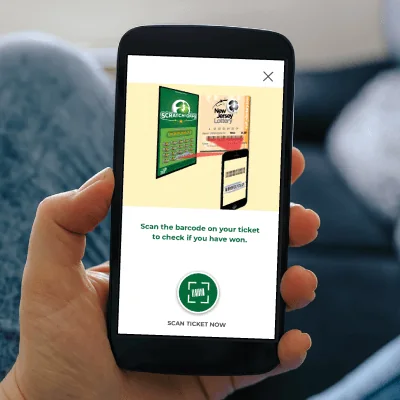
Open the official app's ticket-checking function and use the barcode indicated by its instructions. Allow camera access when requested, place the ticket on a stable surface and keep the complete code in view. Improve light and focus before assuming that an unreadable ticket has lost. A camera animation or a partial read is not a substitute for the returned result.
The official app overview describes checks for both Draw Game and Scratch-Off tickets. Use a ticket issued by the appropriate lottery and read the complete response. A ticket bought in another jurisdiction needs its issuing lottery's checking instructions, even when the game name is also sold in New Jersey.
Keep draw dates and game names attached to a check
For a draw ticket, identify the game, purchased dates and any drawing sessions. If several drawings were purchased, keep those dates together and check every applicable result. A single completed drawing cannot establish the outcome of entries that have not yet taken place. Keep the ticket until outstanding dates and any prize questions are resolved.
For Pick-3 and Pick-4, the selected play type matters alongside the digits. Exact-order and any-order wagers are different purchases. Do not rearrange a number on a results page and assume the original ticket's wager has changed. The New Jersey Pick-3 and Pick-4 guide explains the rules behind those comparisons; the state results page helps locate the game you need.
Check Scratch-Off tickets without confusing game information with a prize
The app also offers Scratch-Off game details and remaining-prize information. Those features describe the game as a whole; a table of unclaimed prizes does not determine whether your individual ticket won. Use the actual ticket-check result and game instructions for that question. A favorable remaining-prize figure is not a guarantee about the next ticket sold.
If the returned result is unclear, keep the original and preserve the message privately. Record whether the app could not read the code, rejected the ticket or completed the check. That distinction will be useful when seeking official help. A screenshot can document what you saw, but it does not turn a damaged image into a validated claim or replace the original ticket.
Use VIP Club and second-chance entries for their own purpose
The VIP Club is a separate account-based part of the New Jersey Lottery experience. The operator describes it as free and lists second-chance promotions, sweepstakes and communication preferences among its functions. Membership is for adults 18 and older. An account can therefore be useful for promotional participation without changing the outcome of the original game printed on your ticket.
Use the official VIP Club FAQs to identify the relevant program and support route. Million Dollar Replay, Lottery Bonus Zone and Collect 'N Win are not interchangeable titles for the same transaction. Read the current rules for the particular opportunity you selected, including the eligible games, ticket dates and entry period. A screenshot from an older promotion cannot establish that the same ticket is eligible today.
For an account-access problem, inspect the email you registered and use the official recovery route when needed. The promotional support page distinguishes signing in, registering and recovering a forgotten password. Avoid repeatedly creating profiles merely because one sign-in attempt failed. If access remains unclear, provide the account email through the official private support channel, not a public discussion.
For an entry problem, identify what you actually submitted and the record you expected. Scanning for a promotion can create an entry record or another program-specific response; that is different from a check of the original ticket's winning status. A confirmation of entry also does not establish that a later promotional prize has been won. Keep the promotion name attached to the confirmation rather than saving an unexplained screenshot alone.
When a code fails, compare the ticket type with the entry form's requested information. The official Collect 'N Win instructions distinguish Draw Game and Scratch-Off entries. A number copied from the wrong part of a ticket can create a different problem from a camera that cannot read a code. Use that program's example rather than substituting a barcode position learned from another state.
Keep the original ticket as required by the current rules and until any unresolved original-game question is settled. A promotional entry is not a reason to assume all checking or claim obligations have ended. No points balance, animation or entry count should be treated as a universal prize-payment receipt.
Create an ePlayslip before paying for a ticket
The operator's app overview describes creating ePlayslips and presenting their unique barcode, with payment, at a New Jersey Lottery retailer or vending machine. This is a preparation workflow: choose the intended game and selections before completing the actual purchase. Check that the feature is available in your current app version rather than assuming that every platform currently shows the same option.
That qualification matters because the operator's coming-soon notice discusses features that have not launched and says ePlayslips will return on Android with the new app. An announcement of a planned return is not proof that the function is already restored on your phone. If your installed version does not offer it, use the currently available authorized purchase process rather than searching an unrelated menu indefinitely.
A saved barcode is a selection rather than a purchased entry
Where ePlayslips are available, inspect the selected game, numbers and options before showing the barcode. The operator also describes saving choices in My Favorites. Saving a selection makes it easier to retrieve; it does not establish that a retailer accepted payment or printed a ticket for the drawing you intended.
After the retail transaction, read the ticket actually issued. Confirm the game, purchased drawing and wager rather than relying on the selection displayed earlier in the app. A cached favorite can be familiar enough to overlook an unwanted option. Keep the issued ticket and any relevant transaction record so the purchase can be distinguished from the earlier preparation step.
Do not confuse an ePlayslip barcode with the barcode used to check an original ticket or with a promotional entry code. All can appear during a phone-based lottery workflow, but the action being performed differs. Presenting a playslip requests a purchase; checking a ticket asks about an existing purchase; entering a promotion follows that promotion's rules.
Set the total cost before choosing repeated plays or additional options. Reusing favorite numbers is an organizational convenience, not a method of improving their probability in a fair drawing. Stop if the displayed transaction does not match what you intended, and ask for clarification before treating an app selection as a completed entry.
File a mobile claim only when the ticket and account qualify
New Jersey provides a mobile claim route for eligible prizes in a published range. This is a separate step after checking the ticket, not simply another name for scanning. The operator's current guidance is the appropriate starting point when a check identifies a possible prize; another state's mobile-cashing limits do not determine the New Jersey process.
Check the published prize range and the live instructions
As checked on November 17, 2026, the official claim page describes mobile claims for prizes between $600 and $10,000. It says claimants can choose a check or direct deposit into a bank account. Read the instructions presented for your ticket and account before proceeding; falling numerically within a range does not replace the rest of the applicable claim requirements.
The October 30, 2025 announcement explains that an eligible winning check can lead to a mobile-claim option and instructions for secure submission. Use the live process rather than assuming that every winner will see an identical menu. If the option is absent or the ticket presents an unusual issue, follow the operator's current alternative claim instructions instead of repeatedly scanning in the hope of changing its eligibility.
Keep the ticket secure and retain the claim information the process provides. Submit personal or banking details only through the official channel you reached deliberately. A request in an unsolicited message is not made official by mentioning a prize amount you recognize. This guide does not collect claim information or process payments.
Keep submission, processing and payment separate
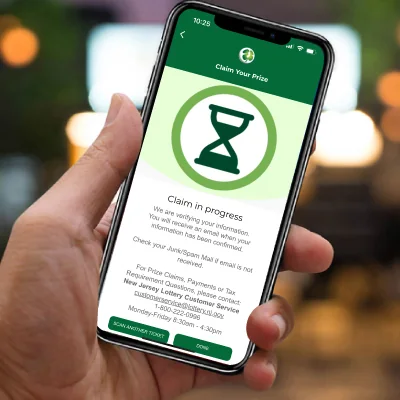
A submitted form, an accepted claim and money received are different stages. Save a private confirmation and any reference supplied, then use the operator's status guidance if a question remains. Do not interpret a closed screen or a missing animation as proof of either approval or rejection. Record what the system actually confirmed.
If you contact support, explain the ticket-check result, whether you started a claim and the latest status you saw. Keep screenshots private and provide sensitive information only when the official channel requests it. The appropriate claim route can also depend on circumstances beyond the basic amount. This article provides general checking guidance, not individual legal or tax advice or a guaranteed processing timetable.
Resolve a failed scan through the correct official channel
A failed scan needs a precise description. If the camera never opens, inspect its permission for the app. If the code is visible but blurred, adjust light, focus and steadiness. If the app returns a ticket message, keep that message instead of describing the problem only as a camera fault. These observations help determine whether another optical attempt is useful.
Check for an update through the official store and preserve your account details before making a larger change. The operator's VIP Club FAQ recommends uninstalling the app, restarting the device and reinstalling when app problems persist, then contacting support if necessary. Treat that as published troubleshooting guidance, not a guarantee that reinstalling restores every ticket, account or promotional record.
Do not turn a damaged barcode into an experiment. Keep the ticket intact, avoid cutting or altering its identifying information and use the operator's guidance. The current claim page specifically addresses a ticket that appears to win but is damaged, fails to scan or reports an unexpected prize value: it directs the player to file a claim with a brief explanation so the ticket can be investigated. Follow the current instructions for that situation rather than discarding the ticket because one phone attempt failed.
For a reproducible app problem, record the platform, device, installed version, ticket type and exact response. Explain whether the failure concerns checking, a promotional entry or a claim. Keep passwords, banking details and ticket codes out of public posts. Submit sensitive ticket information only through the official private route when requested.
If you only need to compare draw numbers, the LotterySnap checker offers a narrower alternative while you resolve scanning access. It cannot validate an original barcode or determine a Scratch-Off's official outcome. For either a possible win or a disagreement, the issuing lottery's records and procedures remain the relevant authority. LotterySnap is an independent information site and does not sell tickets, accept wagers or pay prizes.
Checking an existing ticket does not require another purchase. Keep additional play within an entertainment budget, and remember that selecting familiar numbers or using an app does not improve a fair drawing's mathematical odds. Confirm the task you intended to perform, preserve its evidence and stop repeating steps that do not address the actual problem.

Loading comments...