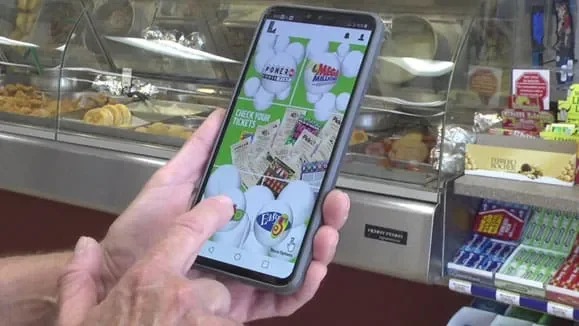
Use the official Louisiana Lottery app to scan the front barcode on a paper ticket. Use the Lottery’s Check My Numbers form to enter the game, drawing dates and numbers for a draw play. If all you need is the published draw result, open the state’s Louisiana lottery results page and find the matching game and date.
The first two tools answer different questions. A scan checks the physical Louisiana ticket’s status. A date search compares the numbers you type with published results. Keep the original ticket for a retailer check or a prize claim, and use the date printed for the drawing when verifying a match.
Find the official Louisiana Lottery app
On Android, look for Louisiana Lottery Official App on Google Play, under developer Intralot US. On iPhone or iPad, look for Louisiana Lottery on the Apple App Store, under developer Intralot, Inc. Apple's listing identifies it as the Louisiana Lottery Official App in its subtitle. Both listings describe scanning the front of a physical ticket and saving the results for later reference.
Start with the state printed on the ticket. A search for “LA lottery ticket checker” can mean Louisiana or a ticket somebody bought in Los Angeles. A ticket issued by the Louisiana Lottery belongs with the Louisiana app, even if you are checking it while traveling. A California-issued ticket belongs with the California State Lottery. Powerball and Mega Millions are sold through multiple state lotteries, so the game logo alone does not establish who issued your ticket.
Use the store publisher line as well as the app name when choosing which one to open. Searches also return products under the names LA Ticket Scanner and Louisiana Ticket Scanner from a different publisher. The links above identify the app described by the Louisiana Lottery. When returning to a previously installed copy, open its store listing to verify that it corresponds to the official publisher. This is especially handy when several apps on your phone have similar names or icons.
The Lottery also offers a date-and-number form in a browser. Choose that if all you have is a set of draw numbers or if you want to check how a play compares with past results. Keep the paper ticket handy if you have it. The app uses its barcode to check a specific purchase, the browser uses the numbers you enter, and a prize claim depends on the original ticket.
Scan the barcode on your Louisiana ticket
Open the official app and choose Check Your Tickets from the home screen. Allow camera access when your device asks for it. The Louisiana Lottery app guide shows a yellow scanning box for lining up the barcode. Lay the ticket flat in good light so the camera can see the whole code at once. Moving the phone back slightly can help if the image is sharp in the middle but cuts off the ends.
Scan a draw ticket or scratch-off
For a draw ticket such as Louisiana Lotto, look near the bottom of the front for the barcode. Center that code in the scanning box. If the paper is curling, smooth it before moving the camera. Multiple played lines can appear on the ticket, but the scan uses the ticket barcode. It can check the purchase without asking you to enter each line in the app.
For a scratch-off, the code used by the app is on the front under the scratch material. Reveal it gently and then frame it with the camera. Keep the whole ticket, including the parts of the play area away from the barcode, because the Lottery requires the original to claim. The Lottery's daily games brochure also lists scanning for Fast Play tickets. Those have no future drawing to match against a date range.
When the app reads the ticket and a result is available, the Lottery says it indicates winning status and the amount if it shows a win. Read that return screen before moving on to the next ticket. With a stack of tickets, a simple way to keep them straight is to put the ticket you just scanned aside before placing the next one under the camera.
Reopen a saved result when more drawings are due
The Lottery's guide shows a profile icon that opens User Account, where you can choose Checked Tickets and reopen a previously scanned ticket. The official description says the saved status updates as drawings occur on a multidraw ticket. The operator's privacy policy explains that the checked-ticket information is stored on your device. If you are using a different phone and cannot find the previous entry, use the paper ticket as your starting point.
Suppose a physical ticket covers three drawings. A scan after the first one may provide information about that drawing while two others remain. Open the saved entry after those draws and compare the remaining dates with the printed ticket. An entry with a pending draw is a reason to keep the ticket handy. With a single-draw ticket, use its one printed draw date when looking up the result or following up about a scan.
Keep the physical ticket until you have checked every drawing it covers and taken any needed claim steps. The saved app entry can tell you which purchase you checked. You may still need to compare the ticket itself against a result or show the original to a retailer.
Run a date search in Check My Numbers
The Louisiana Lottery's Check My Numbers form searches draw results for the plays you enter. Use it when you want to compare a particular line against a past date or see whether the same line matched within a short run of drawings. You can open it in a regular browser without turning on your phone's camera. Start from the form itself. A Ticket Checker Results page also appears in some search results and expects a submission.
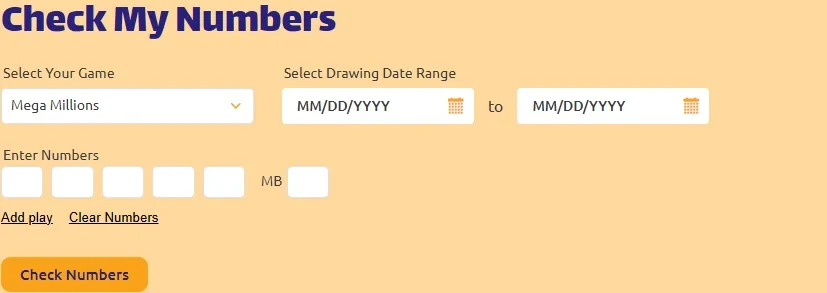
Choose the game, drawing dates and numbers
Start with Select Your Game. The form includes Powerball, Mega Millions, Pick 3, Pick 4, Pick 5, Lotto and Easy 5. Select the exact printed game because the game determines how many numbers the form asks for. The Mega Millions view, for example, has a separate field for the Mega Ball. Louisiana Lotto and Easy 5 use their own number fields.
Use the Start Date and End Date fields in MM/DD/YYYY format. For one drawing, set both fields to the printed draw date. For a multi-draw ticket, start with the run of dates documented on that purchase. A ticket printed on Monday may say it is for a later drawing. Use the printed draw date to compare that line, even if you remember the day you bought it more clearly.
Copy all the numbers for one printed play into a single row. Use Add play to create another row for the next line, or Clear Numbers to start over. Enter any separate ball in its dedicated field and select Check Numbers. One game and date range apply to the plays in that comparison. If your second ticket is for a different game, run it as a new search with the matching fields.
Read a match in context
Check the date beside a matching result and compare it with the ticket. A match in a broader date search can show that those numbers came up at some point during the range. You still need to check whether the purchase covered that drawing. The official Louisiana Winning Numbers page lists results by game and draw date, making it useful when you want to inspect the draw itself.
For daily digit games, include the leading zero when the printed play starts with one. A hypothetical Straight Pick 3 play of 0-4-7 uses those digits in that order. A Box play uses the digits under that play type's rules. Read the printed play type before deciding what a match means. For a jackpot game with a separate ball, verify the main set and then check the special ball for that game.
The numbers form covers draw games. Use the app or a retailer for a scratch-off or a Fast Play ticket. When a web match looks promising, take the original ticket back to the app or an authorized retailer for a check of the specific purchase. The form calculated its result from the dates and plays you typed, and a change in either can change what you see.
Resolve a scan error or a missing result
Start with what the screen is doing. If the camera never opens, check the app's camera permission in the phone's settings. If the camera opens but never reads the code, inspect the front barcode and check whether a fold or reflection crosses it. Shift the ticket or phone until the full code is sharp. Once the paper is damaged or the barcode is incomplete, a retailer or the Lottery can tell you how to have the original inspected.
When the scan completes but you are waiting for a draw result, check the date or remaining draws in the ticket entry. Then search the official winning numbers page for the same game and date. The archive has date filters and expandable results. If a draw is absent, confirm that you selected the draw date and that the relevant game actually drew on that date. Try again once the official result appears, especially if you checked soon after the scheduled drawing.
If the result appears in the archive and you want to claim immediately, check whether the retailer system has the draw data it needs. The Louisiana Lottery's claim FAQ explains that winnings and prize data must be checked and loaded before retailers can pay. For Powerball and Mega Millions, the Lottery also waits for clearance from the Multi-State Lottery Association. A draw result and the readiness to redeem a ticket can therefore become available at different times.
A missing result in a web comparison can also come from a wrong date range or number entry. Reopen the form and check the game, digits and the date printed beside the plays. Make sure you did not enter a Powerball in the Mega Ball field by selecting the wrong game. Use the draw record itself if you want to see exactly what the operator published for that date before checking the ticket in person.
Save the original while you investigate. If one service gives you an error and another shows a possible match, take the ticket to an authorized retailer. You can explain which game and draw you were checking and what the screen said without posting the ticket barcode publicly. The retailer can use its terminal to see whether there is a valid ticket and an amount to claim.
Verify the ticket at a retailer and claim on time
Take the physical ticket to a participating Louisiana Lottery retailer if you want an in-person check. Ask the retailer to scan it and watch the customer display for the result and any prize amount. If you need a record of what the terminal found, ask for a validation receipt. The Lottery's player protection guide also recommends signing the back of your ticket so it can be associated with you.
Some retailers have Louisiana Lottery WinStations with a separate Did You Win? scanner. They can read the front barcode and show status and value. The state says a driver's license scan is unnecessary just to check a ticket there. If you want to collect a cash prize, take the original to the retailer or follow the Lottery's claim instructions. The WinStation displays instructions based on the prize and does not dispense cash.
Participating retailers can pay winning tickets worth $600 or less. For a larger prize, review the Louisiana Lottery's prize payment instructions for the correct office, documents and whether mail is available. Larger prizes can have different rules depending on the game. Read the original-ticket requirements before sending anything. A saved app screen can help you remember what you saw, while the claim is handled through the Lottery's approved options.
For a draw-style prize, the Lottery says the claim deadline is 180 days after the drawing that produced the prize. Scratch-off and Fast Play prizes have a 90-day window from the announced closure of the game. Use the exact game title or number on the original and check the Louisiana Lottery's Last Day to Claim listing for the final redemption date. The day you bought or scanned the ticket does not start those clocks.
For example, if you find an old scratch-off in a drawer, check the title and game number before assuming it is too late. If you find a draw ticket, look up the printing that identifies the game and the date covered. A number comparison can help you decide what to follow up on. The deadline and ticket validation then determine what you can do with a possible match.
Choose the tool that answers your immediate question. For the drawn numbers, use the Louisiana lottery results page or compare a line in the LotterySnap number checker. For the actual ticket, use the Louisiana Lottery app or a retailer terminal. Once you know the amount shown for the ticket, consult the official claim instructions and retain the paper until the claim is resolved.

Loading comments...